Robotic Process Automation (RPA) takes over dull, repetitive computer work, such as retyping data from one system into another. Hardly anyone enjoys that work, and because it is monotonous, attention drops and errors creep in. So RPA can deliver a lot. But seen through a Lean lens, it carries risks too: automating a cumbersome process hides the problem instead of solving it.
What is RPA?
RPA is software that mimics what a person does on a computer. An RPA bot clicks, reads fields, enters data and opens applications, through the same screens as an employee. So there is no robot behind a desk; it is a piece of software that ties systems together as a digital worker.
Applications range from simple, such as sending standard emails, to large-scale, such as hundreds of bots handling administrative tasks in an ERP system.
Where does RPA come from?
When data had to be exchanged between systems, the IT department used to build an interface. That required agreements on how the data was packaged, and a lot of programming. An API (Application Programming Interface) made this easier: a standardised way for systems to pass data to each other.
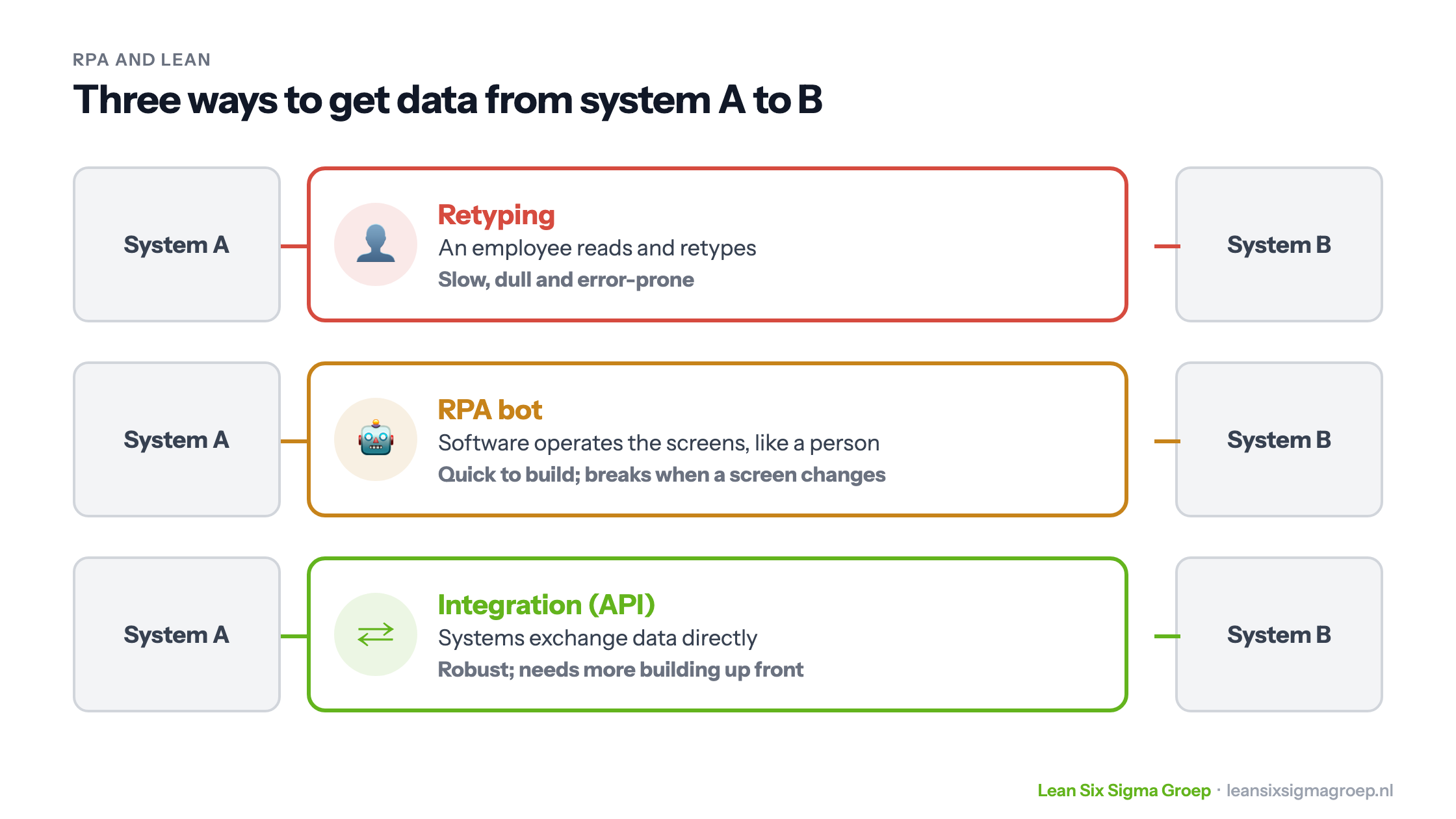
RPA goes a step further, or rather a step around: it doesn’t use the back end of a system, but the front end, the screen. With a visual editor, in which you line up steps as blocks, almost anyone can build such a bot. That makes RPA attractive when building an integration is too expensive or takes too long. The image at the top of this article compares the three ways.
Three types of RPA
- Attended RPA: the bot works alongside an employee, who starts it, for example to look up data during a customer call.
- Unattended RPA: the bot works on its own, for example at night, and processes large volumes, such as invoices.
- Hybrid RPA: a combination, where an employee starts part and the rest runs by itself.
Examples
- Finance: a bot reads incoming invoices, matches them to the purchase order, books them in the ERP system and prepares a payment once approved.
- Healthcare: scheduling appointments and processing claims to insurers.
- Logistics: taking over orders, creating shipping labels and updating stock levels.
- Manufacturing and compliance: combining data from different systems into standard reports.
RPA and AI
An RPA bot follows fixed rules. It does exactly what has been defined, and gets stuck on anything outside that: a different invoice format, a field that has moved. An AI application can handle unstructured information, such as free text or a scanned letter, and choose a step itself. They are increasingly combined: AI reads and interprets, the bot executes. Also read Does AI make the Green Belt redundant?
This is one of the tools you learn to apply in the Green Belt training.
The benefits
- Fewer errors: a bot doesn’t mistype and doesn’t get tired.
- Faster and always available: a bot also works at night and at weekends.
- Quick to build: no major changes to the systems themselves are needed.
- More enjoyable work: staff have time left for work that needs a person.
Vendors often cite large savings, but how much it delivers depends heavily on the process. Researchers at the University of Oxford (Frey and Osborne, 2013) estimated that a large share of jobs is susceptible to automation, but that concerns automation in general, not RPA alone.
The risks, through a Lean lens
Hidden work gets hidden even better
Workflow systems already push requests, tickets and customer queries from step to step, making work in progress less visible. RPA hides it further. How much work is waiting, where, and for how long? If nobody sees that any more, waste and bottlenecks become harder to find. Whoever builds a bot should therefore consciously decide which figures stay visible.
A suboptimal process gets locked in
When setting up a workflow system or bot, the focus is mainly on which information has to pass along, who has which rights and which reports are needed. Rarely on the process itself: does the rhythm of the steps match the rhythm of customer demand? Without improving that first, you automate a cumbersome process, or rather: hide it.
More work than expected
Almost anyone can put a bot together, but it concerns business data. A mistake can do a lot of damage. So the bot must be tested first, maintained, and updated when a screen changes. The work shifts back to the IT department after all, and you add an extra step between two systems that could have been linked directly. In Lean terms: overprocessing.
Lean first, then RPA
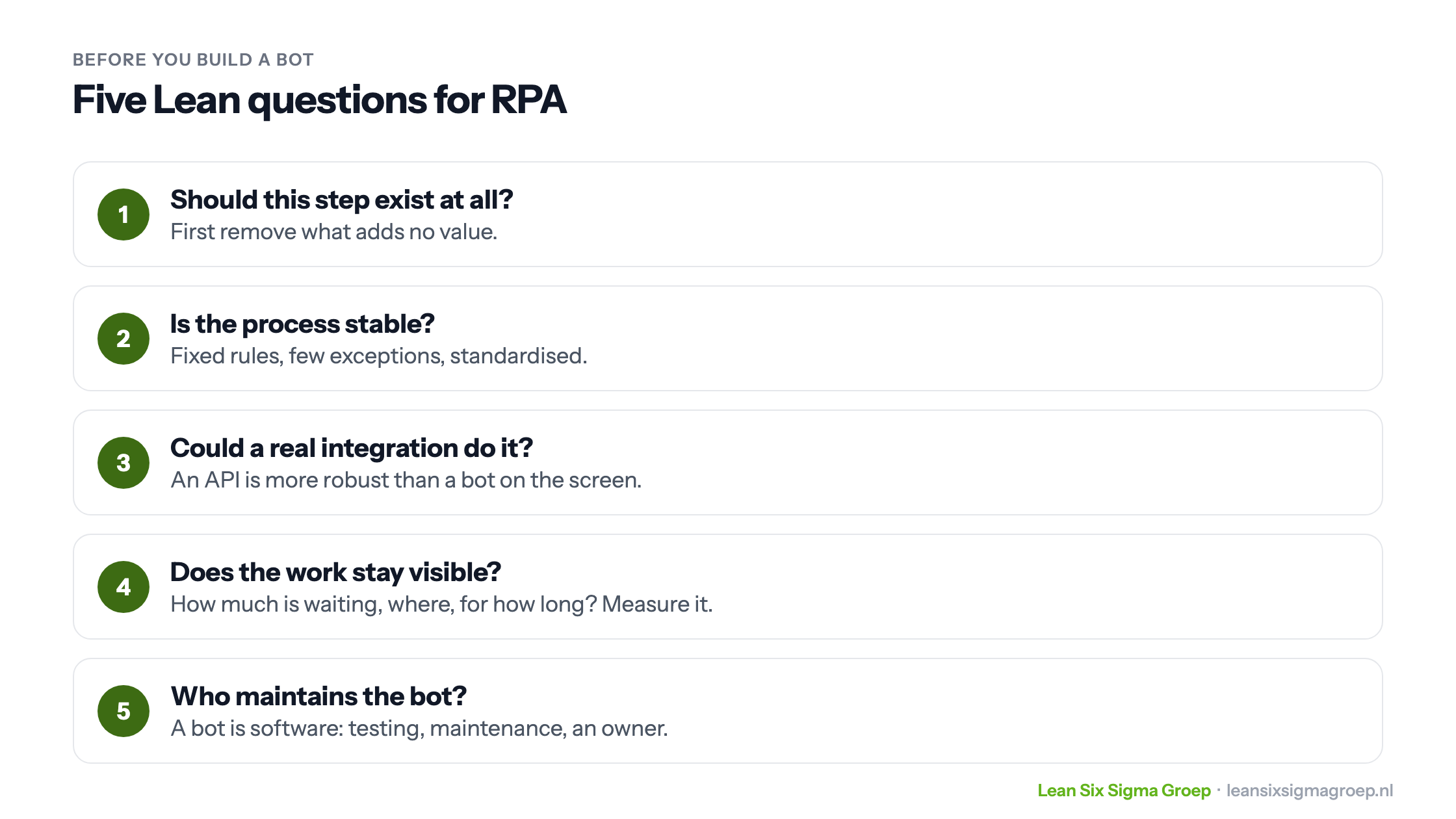
RPA works best on a process that has already been improved. So first ask the five questions above: should the step exist, is the process stable, could a real integration do it, does the work stay visible, and who maintains the bot? The order eliminate, simplify, standardise and only then automate is explained in Automating with Lean. With process mining you can see beforehand how the process really runs.
Well-known RPA tools
Widely used packages include UiPath, Automation Anywhere, SS&C Blue Prism and Microsoft Power Automate. Which fits best depends on cost, complexity and the systems you already have.
RPA can be a powerful tool, but it doesn’t replace process improvement. Look critically at the real value, and keep sight of your process. Then RPA helps you forward instead of hiding your problems.